Table of contents
Open Table of contents
The Prologue
I forgot a lot of things along the way, but what I will never forget is the feeling of seeing my first animated series, movies and games. Above all Disney movies (of course) and the Pokemon Games/Series. Being a kid you’re much more creative and I can remember creating the most astonishing worlds and characters in my head. I used to draw a lot as well and I was always disappointed when I realized that I couldn’t make the drawings move as they did in the movies.
The Beginning
2023
This brings us to the year 2023 (a lot has happened since then) and I am in the process of creating my own short video game, which you can check out here. I learned the basics of pixelart (which I will cover in other blog posts) and I tried to animate all of my characters, which was a long and difficult process.
My Motivation
I was never completely satisfied with the results, but keeping in mind that I didn’t know the basics of animation and was just trying to make it work, it came out pretty good. Now I want to dive deeper into the world of animation and finally learn it properly.
The Proof is in the Timing
The first concept one has to understand when it comes about animation is timing. Timing determines when an action is happening but also how often it is happening. It sets the rhythm of where things happen in the animation. Animation itself is just a series of pictures and you smarty pants brain “completes” the picture sequence in a way that is logical for you. Showing you one picture or “frame” per second will not do much, but showing let’s say 12 frames per second makes a difference.
Timing Basics
An example
Let’s say I draw four pictures/frames and I play them in sequence. You can see each frame for 100ms until the next one appears. Our framerate in this case is 10 frames per second (fps). So if this animation where to go for exactly 1s the viewer would see 10 drawn frames/pictures. I decided to draw my animation in 4 frames with 100ms each (in total 400ms). This is the overall timing of our animation.
The Timeline
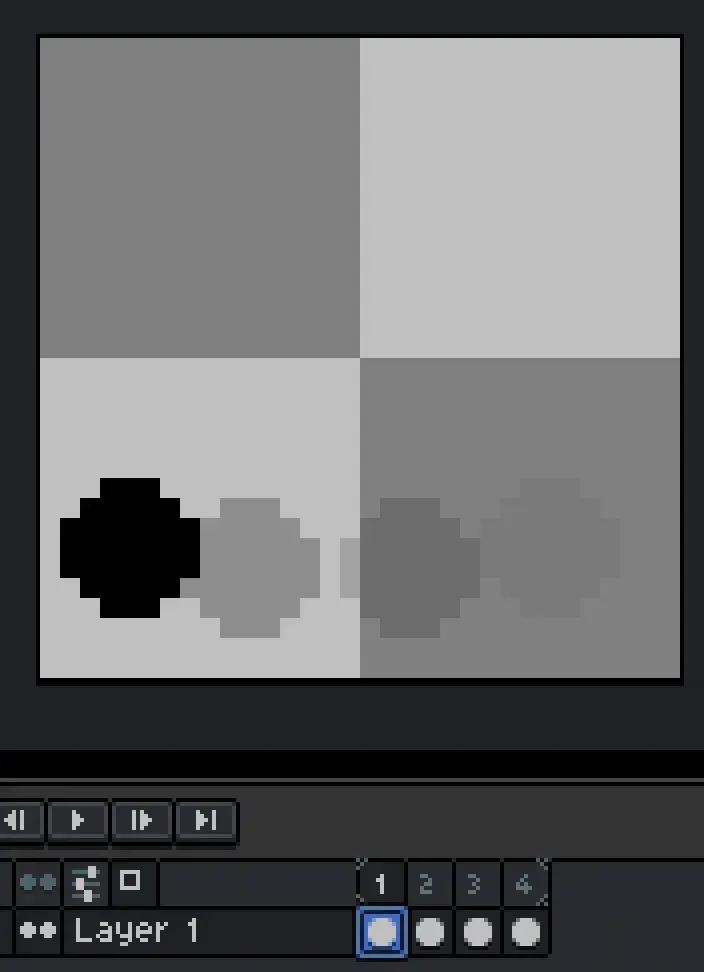
All softwares that deal with animations have a timeline where you can see the frames you already have an add new ones. Normally, you can also edit how fast each frame is individually. In my case I use Aseprite and it looks like this:

The Animation Process
In each frame I draw a simple circle at a different position from left to right. If I were to look at all of the frames at once it would look like this:
The looped animation with our current timing (100ms per frame) looks like this:

Changing the Timing
If we were to change the timing to 300ms per frame, meaning you see each frame three times longer than before, the animation would look like this:

First Conclusion
Timing gives you as the animator the opportunity to make your animation faster or slower. Next up is a more advanced concept of timing.
Timing Advanced
The Timing Points
Timing is also used to determine the timeframe between two actions. Let’s say the ball you just saw jumped on the ground. Between each jump there is a certain timeframe. This timeframe can be manipulated by you to specify how much time elapses between each action (bouncing of the floor) that the ball makes.
An example
The next animation demonstrates what I mean. Please note that each time the ball has a red outline signals a timing point that I set for the action (the contact with the floor) of the ball. I not only timed the whole animation by deciding how many frames it should have but also how many frames are between each bouncing point of the ball (in this animation 8 frames until the first contact point and 6 for the next).
This is the animation with each individual frame:
This is the animation as it should be seen:
What now?
That is the first principle that I wanted to cover in this series. You can already do a lot if you know this! But what next? Next time we’ll talk about the concept of spacing and combine these two together to give our animations a more natural look. I hope you enjoyed this post and I’ll see you next time!