Table of contents
Open Table of contents
A walk in the park (not)
Walking is something so natural to us (for most of us) that we don’t even think about it. But when you try to animate a walk cycle you’ll quickly realize that it’s not that easy. This one was quite the challenge, but I think in the end I got a decent result. I’ll show you the steps I took to get there.
The character
I quickly designed a character that can be used in the future for whatever I want to animate. Here’s the character:
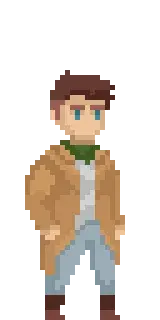
I wanted to give my character a bit of an “adventurer” vibe, that’s why I chose the jacket and the scarf. These are also great for animating as they can provide “secondary actions” which I will talk about in future posts. In short, secondary actions are actions that are not the main action of the character but are still important to make the character feel alive, like a jacket flapping in the wind.
The Approach
The approach I chose to start animation my walk comes from the awesome AdamCYunis. He is a content creator on Youtube and responsible for a lot of progress in my pixel art. The approach he uses is to start animating the limbs of the character first. He starts with blobs and easy shapes and then refines his animations. Here’s the video where he explains his approach. The infos on how a walk cycle works and looks I took again from the amazing Animator’s Survival Kit by Richard Williams. I can’t recommend this book enough.
Walk types
There are infinite types of walks. I will try to explore many of them in the future but for now I wanted to start with a combination of a basic walk and a walking style that suits my character. I opted for a walk that transmits the certainty and self confidence of the character I designed.
The basic walk cycle
The basic walk cycle can consist of 2 frames which just animate the legs back and forth. The book shows a 4 frame walk cycle which I used as a base for my animation. The 4 major poses are (from left to right):
- The passing position
- The “up” position
- The contact position
- The “down” position
Here’s a visual representation of the poses:
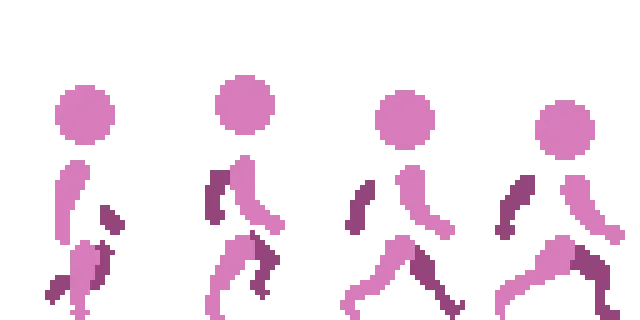
The passing position straightens the leg that is on the ground and the other leg is in the air. The “up” position is the highest point of the walk and transmits the intent to move. The contact position is where the leg that was in the air touches the ground. The “down” position is where the weight of the character can be felt the most. The arms are also moving in a way that feels natural to the movement of the legs. The arms are in the opposite position of the legs. If the right leg is in front the right arm is also in front and vice versa. Thinking this way makes it easier to know how the arms should move.
Animated it looks like this:

To achieve this animation I animated the first 4 frames, copied the passing position to the end of the animation and then animated the last 3 frames by recycling the first 3 frames after the passing position but changing the back leg/arm to the front leg/arm and vice versa. This way I got a decent walk cycle. In total the animation consists of 8 frames.
Putting it all together
Using the rough animation as a base I started to animate the characters limbs frame by frame until I had the basic version of my walk. To make it easier for me I just layered the rough animation that I already have on top of my character and reduced the opacity.
This is how it looks like after the first pass:

I then started to refine the animation by adding shadows and secondary actions like the jacket, the scarf and the hand movement. I also corrected poses that felt off and made the animation less fluid.
The final animation looks like this:

What I learned from this
Animation takes a really really long time! Drawing the character, animating the limbs, refining the animation, adding secondary actions, shadows and highlights etc. took about 2-3 hours. But it was worth it. In the end it came out like I wanted and I learned a lot about the process of animating a walk cycle.
Up Next
Next I’ll tackle more types of walks and also walks in different directions. Stay tuned!